
In This Article
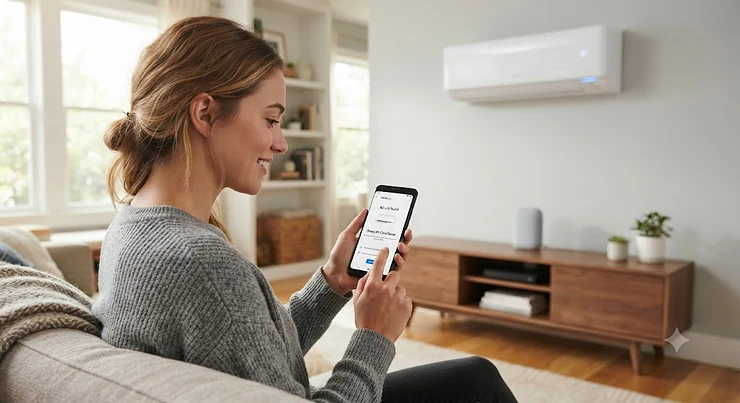
Somewhere between “just open a window” and “hire an HVAC contractor” sits a genuinely useful middle ground: a Google Home air conditioner that lets you cool a room with your voice, a phone tap, or a scheduled routine that fires before you even walk in the door. If you’ve ever stood in a doorway at 6 PM, keys in one hand, groceries in the other, wishing the bedroom were already cold, that’s the exact itch this category scratches. A Google Home air conditioner is any cooling unit, or any retrofit controller attached to an existing unit, that links into the Google Home app so “Hey Google, cool down the bedroom” actually does something. Some units build the Wi-Fi radio straight into the compressor housing; others clip onto an old window unit and translate your voice into the same infrared blast the remote would send.
Before diving into specific units, it helps to know what’s actually doing the listening: Google Assistant is Google’s voice-driven software layer that powers these commands, and it’s been steadily extending its reach into third-party smart home appliances since its 2016 debut. This guide walks through seven real products spanning budget window units, mid-range inverter models, and small retrofit gadgets that turn any dumb AC into a voice-controlled one. You’ll get honest analysis pulled from manufacturer specs and aggregated review sentiment, not marketing fluff, plus real comparisons of who should buy what. According to the U.S. Environmental Protection Agency’s ENERGY STAR program, room air conditioners with efficient variable speed compressors can continuously modulate cooling output, which is exactly the kind of feature separating a merely “smart-sounding” unit from one that actually saves money. We’ll dig into that distinction, plus setup tips, common headaches, and a buyer’s framework so you don’t end up returning a unit that’s wrong for your window, your Wi-Fi, or your budget.
Quick Comparison Table
| Product | Type | BTU / Coverage | Best For |
|---|---|---|---|
| Midea 12,000 BTU U-Shaped Smart Inverter | Window AC | 12,000 BTU / 550 sq ft | Best overall all-rounder |
| GE Profile ClearView | Window AC | 10,300 BTU / 450 sq ft | Quietest operation |
| Frigidaire Gallery Smart Inverter | Window AC | 10,000 BTU / 450 sq ft | Best budget ENERGY STAR pick |
| LG Dual Inverter Smart Window AC | Window AC | 10,000 BTU / 450 sq ft | Best native “Hey Google” integration |
| Sensibo Sky | Retrofit controller | Works with any remote AC | Cheapest way to add voice control |
| Cielo Breez Plus | Retrofit controller | Works with any remote AC | Best onboard display and controls |
| TCL Smart Inverter Window AC | Window AC (Matter) | 8,000 BTU / 350 sq ft | Most future-proof, cross-platform |
Looking at this lineup, the split between full window units and small retrofit boxes matters more than it looks. The Midea 12,000 BTU U-Shaped Smart Inverter and GE Profile ClearView replace your entire cooling setup, while the Sensibo Sky and Cielo Breez Plus simply bolt smarts onto whatever AC you already own — a huge cost difference if your current unit still works fine. Meanwhile, the TCL Smart Inverter Window AC stands apart because its Matter certification means it’ll keep working with Google Home even if you eventually switch your smart speaker brand, something none of the other window units here can promise.
💬 Just one click — help others make better buying decisions too!😊
Top 7 Google Home Air Conditioners: Expert Analysis
1. Midea 12,000 BTU U-Shaped Smart Inverter — open-window design meets serious cooling power
The party trick here is the U-shape: the compressor splits around the window sash so you can still crack the window open even with the unit installed, which regular units simply can’t do. Under the hood, the inverter compressor modulates its speed instead of just clicking on and off, and Midea claims up to 35% energy savings compared to a standard fixed-speed window unit of the same output — a meaningful number if you’re running this all summer in a 500-plus-square-foot living room. The 12,000 BTU rating covers roughly 550 square feet, so this isn’t a bedroom unit; it’s built for open-plan living spaces or larger primary bedrooms.
Based on the spec sheet, buyers who care about both light and airflow benefit the most here: the U-shaped design tucks the noisy compressor outside your window frame, and Midea’s independent lab testing shows sound levels as low as 33 dBA, dramatically quieter than the rattly window units most people grew up with. This one is for renters and homeowners with larger rooms who want strong, quiet cooling without sacrificing their view or their ability to get fresh air on a nice day.
Reviewers consistently note that the SmartHome app pairs quickly with Google Assistant, and the anti-theft window lock is a small but appreciated safety touch for ground-floor installs. A recurring theme in aggregated feedback is that the included drain plug needs occasional attention to avoid pooling condensation — a minor maintenance item, not a dealbreaker.
Pros:
- ✅ U-shaped design lets the window stay openable
- ✅ Inverter tech delivers real energy savings over time
- ✅ Quiet operation down to roughly 33 dBA
Cons:
- ❌ Installation is fussier than a standard flat window unit
- ❌ Best suited to double-hung windows only
This model typically lands in the $470-$550 range depending on retailer and season, and given the inverter savings and open-window flexibility, it’s a strong value for anyone cooling a larger room long-term.
2. GE Profile ClearView — the quietest window AC you can actually see through
GE flipped the traditional window-unit shape upside down, so the bulk of the machine hangs below the windowsill instead of blocking the pane. What most buyers overlook about this design is that it’s not just cosmetic — it genuinely lets more daylight into the room, which matters if your window is your only real light source. The 10,300 BTU model covers about 450 square feet, and its flex-depth chassis adjusts to fit wall thicknesses between 4.5 and 13.75 inches, so it’s more adaptable to odd window setups than most competitors.
On paper this is the noise leader in the category: GE positions ClearView as the quietest window AC brand in the US, with the unit reaching sounds as low as 40 dB in testing, though independent hands-on review measured closer to 45 dB in Eco mode with the fan on low. That gap between marketing spec and real-world result is worth flagging honestly rather than glossing over — it’s still quiet, just not whisper-quiet.
Aggregated reviewer sentiment is largely positive on cooling performance and the SmartHQ app’s scheduling features, though a few users report a fussier initial installation than typical units and some early hiccups getting the app to recognize the unit on first pairing. This is a strong pick for anyone in a light-starved apartment who refuses to trade window view for cool air, and for households where quiet operation during sleep or video calls is a real priority.
Pros:
- ✅ Sits below the sill for maximum natural light
- ✅ Flex-depth chassis fits unusually thick or thin walls
- ✅ Rated among the quietest window ACs on the market
Cons:
- ❌ Initial app pairing can be finicky for some users
- ❌ Installation is more involved than flat units
Pricing generally falls in the high-$400s to mid-$500s range, positioning it as a mid-tier investment that rewards buyers who prioritize daylight and quiet over raw power.
3. Frigidaire Gallery Smart Inverter — the ENERGY STAR Most Efficient budget standout
If cost-per-BTU is your primary concern, this is where the Frigidaire Gallery lineup earns its keep. The 10,000 BTU model is ENERGY STAR Most Efficient certified, and Frigidaire’s own testing puts annual energy savings around 46% compared to a standard non-inverter unit of the same size — a genuinely large number that compounds every summer you own it. Here’s what to weigh: inverter compressors like this one cost more upfront than old-school fixed-speed units, but the payback period shrinks fast if you’re running the AC for months at a time in a hot climate.
Reviewers consistently note that the unit’s Eco Mode and Sleep Mode combination noticeably reduces both noise and power draw overnight, with independent measurements putting operating noise around 41-42 dBA. What most buyers overlook is the washable filter design; it’s a small feature, but it saves you from buying replacement filters every season, and it keeps the unit running near its rated efficiency instead of gradually clogging up.
The app control covers on/off, temperature, mode, and custom schedules, and voice pairing with Google Assistant is straightforward according to aggregated setup feedback. A common thread in reviews is genuine surprise at how much quieter this unit is than whatever it replaced, which tracks with Frigidaire’s own 20% quieter-than-standard claim.
Pros:
- ✅ ENERGY STAR Most Efficient certification
- ✅ Roughly 46% annual energy savings vs standard units
- ✅ Washable filter cuts long-term maintenance cost
Cons:
- ❌ Fan speed options are limited to three settings
- ❌ Auto swing louver has a narrow range of motion
Expect to pay somewhere in the mid-$400s to mid-$500s range, which is competitive given the efficiency certification — this is the pick for buyers who want the lowest total cost of ownership over five-plus years of use.
4. LG Dual Inverter Smart Window AC — the deepest native “Hey Google” integration
LG built its ThinQ ecosystem specifically to work with both Alexa and “Hey Google” phrasing rather than the generic “Google Assistant” wake pattern some competitors rely on, and that small distinction actually shows up in day-to-day use: commands feel more consistently recognized because LG tuned its skill specifically around natural phrasing. The Dual Inverter compressor is LG’s proprietary take on variable-speed cooling, and it’s paired here with a 10,000 BTU rating that covers roughly 450 square feet — squarely in the bedroom-to-medium-living-room range.
Based on the spec comparison against the other window units in this roundup, LG’s dual-rotor compressor design is engineered to reduce vibration, which aggregated reviewer sentiment backs up with repeated mentions of “smoother” operation compared to older LG units and rival brands. What the spec sheet won’t tell you, but reviewers note, is that the ThinQ app’s energy monitoring dashboard is unusually detailed for this price tier, showing daily and monthly usage graphs that most competitors bury behind a paywall or omit entirely.
This unit suits tech-forward households already invested in the Google ecosystem who want the smoothest voice-command experience without buying a separate retrofit gadget. It’s also a sensible choice for households running multiple Google Nest speakers throughout the home, since LG’s routines integrate cleanly into existing Google Home groupings.
Pros:
- ✅ Tuned specifically for natural “Hey Google” phrasing
- ✅ Dual Inverter reduces vibration and noise
- ✅ Detailed in-app energy monitoring dashboard
Cons:
- ❌ ThinQ account setup is an extra step beyond Google Home
- ❌ Physical remote lacks some app-only features
Pricing typically sits in the $400s to low $500s range depending on retailer promotions, making it a strong mid-range value pick for Google-first households.
5. Sensibo Sky — the cheapest way to make an existing AC talk to Google
Not everyone needs — or can afford — to replace a perfectly functional air conditioner just to get voice control. That’s the entire premise behind the Sensibo Sky, a small plug-in box that reads your AC’s infrared signals and mirrors them over Wi-Fi. Here’s what to weigh: it doesn’t cool anything itself, it simply translates your voice commands, app taps, and automations into the same signals your remote already sends, which means it works with window units, ductless mini-splits, and portable ACs alike, as long as they use a standard IR remote.
What most buyers overlook about a device like this is the geofencing feature, which triggers the AC to switch on shortly before you arrive home and off when everyone leaves — genuinely useful for people who forget to turn off the AC before work. Aggregated reviewer sentiment describes setup as remarkably fast, often under two minutes, and pairing with Google Home as close to instant once the skill is enabled.
The tradeoff, and it’s a real one, is that Sensibo requires direct line-of-sight to your AC unit’s IR receiver, generally within about 16 feet, so placement matters. Reviewers also note the app is more feature-rich than most window-unit companion apps, including a Climate React mode that adjusts settings based on live temperature and humidity readings rather than a fixed schedule.
Pros:
- ✅ Works with almost any remote-controlled AC brand
- ✅ Geofencing automatically manages on/off based on location
- ✅ Setup typically takes only a minute or two
Cons:
- ❌ Requires line-of-sight to the AC’s IR receiver
- ❌ Adds a second app alongside Google Home
At around $100-$130, this is by far the lowest financial commitment in this roundup, and arguably the best value if your current AC still works.
6. Cielo Breez Plus — the retrofit controller with real onboard controls
The Cielo Breez Plus solves the one complaint people have about most retrofit boxes: no physical interface. This unit ships with its own display and touch controls, so you can adjust temperature, mode, and fan speed without pulling out your phone every time — a detail that matters more than it sounds like once you’re standing in a warm room at midnight and don’t want to fumble with an app. Independent hands-on testing measured a street price around $109, positioning it just above the Sensibo Sky but below most full window-unit replacements.
Based on the spec comparison, Breez Plus supports both cloud control (through Wi-Fi, Alexa, and Google Assistant) and local control that keeps working even if your internet drops, which the Sensibo Sky doesn’t fully replicate. Reviewers consistently note that the auto-remote-detection setup — point your existing remote at the Breez Plus, press power, done — works cleanly across a wide range of AC brands, including many mini-split systems that other controllers struggle with.
What the spec sheet won’t tell you, but reviewers note, is that build quality on the mounting hardware isn’t its strongest feature; a couple of independent reviews mention the base stand feeling more fragile than expected during unboxing. Still, aggregated sentiment is strongly positive on the feature set, particularly the humidity-aware Comfy mode and the 24/7 customer support line.
Pros:
- ✅ Built-in display for controls without a phone
- ✅ Local control keeps working during internet outages
- ✅ Broad compatibility across mini-split and window AC brands
Cons:
- ❌ Mounting hardware feels less durable than the electronics
- ❌ Slightly pricier than comparable retrofit controllers
Expect to pay roughly $100-$120, making this the pick for buyers who want retrofit savings without giving up a tactile, on-device control experience.
7. TCL Smart Inverter Window AC — the most future-proof, cross-platform pick
Every other window unit on this list ties its smart features to a single company’s cloud service, which is fine until that company changes its app, sunsets a feature, or gets acquired. The TCL Smart Inverter Window AC sidesteps that risk entirely by building in Matter certification, meaning it natively works with Alexa, Google Assistant, HomeKit, and SmartThings without needing a separate brand-specific skill for each. At 8,000 BTU covering roughly 350 square feet, it’s sized for a bedroom or small living room rather than an open floor plan.
Here’s what to weigh: Matter is still a relatively young standard, having only reached its 1.0 specification in October 2022, so while it’s officially supported by the likes of Google Home, Nest, Amazon Echo, and Apple TV, some advanced per-brand features may lag behind what a manufacturer’s own proprietary app offers. What most buyers overlook is that this tradeoff actually favors long-term flexibility over short-term feature richness — if you ever switch from Google Home to a different smart speaker ecosystem, this AC keeps working without a hitch.
Independent testing praised the telescoping side panels and window brackets as noticeably more durable than the flimsy accordion-style baffles found on most budget window units, a small build-quality detail that affects both insulation and how professional the install looks from outside.
Pros:
- ✅ Matter certification means true cross-ecosystem compatibility
- ✅ Sturdier window brackets than typical accordion baffles
- ✅ No brand lock-in if you switch smart home platforms later
Cons:
- ❌ Smaller 8,000 BTU capacity limits it to smaller rooms
- ❌ Matter’s advanced features are still maturing industry-wide
Pricing generally runs around $330-$430, making this an appealing budget-to-mid-range pick specifically for buyers who value platform independence over raw cooling capacity.
Practical Setup & Optimization Guide
Getting a Google Home air conditioner from box to functioning voice command takes about fifteen minutes if you do it in the right order, and most of the frustration people report online comes from skipping steps rather than any actual product flaw. Start by connecting the unit (or retrofit controller) to your home Wi-Fi using its dedicated app — MSmartHome for Midea, SmartHQ for GE, the Frigidaire app, LG ThinQ, or the Sensibo/Cielo apps for retrofit boxes — before you ever open Google Home. Trying to link a device to Google Assistant before it has its own account and Wi-Fi connection is the single most common setup failure reported in aggregated user feedback.
Once the manufacturer app confirms the unit is online, open the Google Home app, tap the plus icon, choose “Works with Google,” and search for the brand name rather than the generic product name. A frequent first-30-days mistake is naming the device something generic like “AC” when you own more than one; Google Assistant genuinely struggles with ambiguous room-based routines when two devices share a similar name, so specific names like “bedroom AC” or “living room cooler” prevent a surprising number of future headaches.
For maintenance, plan to clean or replace filters monthly during heavy-use months — a widely cited energy.gov recommendation for HVAC filters generally applies just as much to smart window units, since a clogged filter forces the compressor to work harder regardless of how smart its Wi-Fi chip is. If you own a retrofit controller, periodically re-point it at your AC’s remote to confirm signal accuracy, especially after firmware updates, since a small percentage of users report temporary command recognition issues immediately following an update before things settle down.
Real-World Scenarios: Matching Buyers to the Right Unit
Consider a college student renting a single studio apartment with one window and a strict no-permanent-modification lease. Budget is tight, the room is small, and portability matters since they’ll move again next year. The Sensibo Sky paired with whatever basic window AC came with the unit (or a cheap replacement) makes the most sense here — no drilling, no big investment, and it travels easily to the next apartment since it works with almost any remote-controlled AC they’ll encounter.
Now picture a family in a 1,900-square-foot single-story home with three Google Nest speakers already scattered through the house, running central air that struggles to keep the sun-facing living room comfortable in July. Rather than overhauling the whole HVAC system, adding a Midea 12,000 BTU U-Shaped Smart Inverter to that one problem room, integrated into the same Google Home routines as their existing Nest devices, solves the actual pain point without a five-figure ductwork project.
Finally, think about a remote worker who’s building out a genuinely serious smart home ecosystem, values quiet on video calls above all else, and doesn’t want brand lock-in five years down the road. The GE Profile ClearView for its noise profile, or the Matter-certified TCL Smart Inverter Window AC for platform flexibility, both fit that priority list far better than a cheaper unit that’s louder or tied to one company’s app roadmap.
Problem → Solution Guide
Problem: Google Assistant doesn’t recognize my AC’s voice commands. This usually traces back to either a vague device name or an incomplete account link between the manufacturer’s app and Google Home. Rename the device to something room-specific and confirm the “linked account” status inside Google Home settings before troubleshooting further.
Problem: The AC turns on via voice but the temperature commands don’t work. Several models, including the Sensibo Sky, only allow voice-based temperature adjustment while the unit is actively running — asking it to change temperature while off can silently fail. Turn the unit on first, then issue the temperature command.
Problem: My retrofit controller stopped responding after a firmware update. Both the Sensibo Sky and Cielo Breez Plus occasionally need a manual power cycle after major updates before command recognition stabilizes. Unplug for thirty seconds, plug back in, and re-confirm the Wi-Fi connection in the manufacturer app.
Problem: The unit runs constantly and my energy bill spiked. This is almost always a sizing mismatch — an undersized BTU rating for the room, or a unit set to a temperature the compressor can never actually satisfy. Cross-reference your square footage against the ENERGY STAR sizing guidance, which stresses that an oversized unit cools too fast without removing humidity, leaving rooms feeling clammy despite lower temperatures, while an undersized unit simply runs nonstop trying to catch up.
Problem: I have multiple smart home hubs and the AC only shows up in one. This is exactly the interoperability gap Matter was designed to close. A Matter-certified unit like the TCL Smart Inverter Window AC can appear across multiple ecosystems simultaneously, whereas proprietary-only units like most Frigidaire or Midea models require you to pick a primary voice assistant.
How to Choose a Google Home Air Conditioner
Choosing the right unit comes down to seven criteria, roughly in priority order for most households:
- Room size and BTU rating. Undersized units run constantly and waste energy; oversized units cool too fast without dehumidifying properly.
- Window compatibility. Measure your window’s minimum height and width before ordering — U-shaped and ClearView-style units have stricter fit requirements than flat units.
- Existing smart home investment. If you already run several Google Nest speakers, prioritize units with confirmed Google Home compatibility rather than assuming “smart” automatically means compatible.
- Retrofit vs. replacement. If your current AC still cools effectively, a controller like the Cielo Breez Plus or Sensibo Sky delivers voice control at a fraction of a full replacement’s cost.
- Noise tolerance. Bedrooms and home offices benefit disproportionately from inverter compressors and documented low-dBA ratings.
- Platform longevity. Matter-certified units reduce the risk of losing smart features if you switch ecosystems down the road.
- Energy certification. ENERGY STAR Most Efficient models cost more upfront but typically pay that difference back within a few cooling seasons in hot climates.
What Is a Google Home Air Conditioner?
A Google Home air conditioner is a cooling unit, or an accessory that attaches to one, that connects to the Google Home app so it can be controlled with voice commands, phone taps, and automated routines. Some units have Wi-Fi built directly into the compressor; others use small IR-based controllers that translate voice commands into the same signals a physical remote sends.
Google Home Air Conditioner vs Traditional Window AC
The gap between a Google Home air conditioner and a traditional window unit isn’t really about cooling power — a basic $250 window AC and a $500 smart inverter model can move similar amounts of heat out of a room. The difference is in control granularity and long-term energy behavior. A traditional unit gives you an on/off dial and maybe a mechanical timer; a Google Home-connected unit gives you scheduling, geofencing, remote shutoff if you forget before leaving for vacation, and usage graphs that make wasted energy visible instead of invisible.
| Feature | Traditional Window AC | Google Home Air Conditioner |
|---|---|---|
| Control method | Manual dial / remote | Voice, app, automation |
| Scheduling | Basic mechanical timer, if any | Custom daily/weekly schedules |
| Remote shutoff | Not possible | Yes, via app from anywhere |
| Energy monitoring | None | Often included in-app |
| Typical price premium | Baseline | +$50-$150 depending on model |
That said, the analysis cuts both ways. Reviewers consistently note that the smart layer adds real convenience but doesn’t fundamentally change the physics of cooling a room — a poorly sized smart AC is still a poorly sized AC, voice control or not. Buyers chasing pure lowest-cost cooling with no interest in scheduling or remote control genuinely don’t need to pay the smart premium; buyers who value automation, energy visibility, or integration with an existing smart home setup will find the premium pays for itself in convenience alone, energy savings aside.
Google Assistant AC Unit: Voice Commands That Actually Work
Once your Google Assistant AC unit is linked, the phrasing you use matters more than most people expect. Broad commands like “turn on the AC” work fine for a single device, but as soon as you own more than one Google Assistant AC unit, specificity becomes essential — “set the bedroom AC to 70” consistently outperforms vague requests in aggregated user reports.
Assistant voice commands generally fall into three buckets that most of these units support: power state (“turn on/off the living room AC”), temperature adjustment (“set the AC to 68 degrees”), and mode switching (“switch the AC to fan mode” or “set the AC to eco mode”). Not every unit supports every mode by voice — fan-speed granularity, in particular, is inconsistent across brands, with some models only exposing high/low rather than the full range available on the physical remote. If precise fan control matters to you, check the manufacturer’s Google Home compatibility page before buying rather than assuming full parity with the app.
Air Conditioner Google Compatible: What “Works with Google Home” Really Means
Not every “smart” AC on a store shelf is actually air conditioner Google compatible, and the badge itself doesn’t guarantee equal functionality across brands. Some manufacturers implement only basic on/off and temperature control through their Google Home integration, while reserving advanced features like humidity targeting or detailed scheduling for their own proprietary app exclusively.
This is also where Google Nest integration gets a little confusing for shoppers, since Google rebranded its smart home hub lineup from “Google Home” to “Google Nest” in some contexts while keeping the “Works with Google Home” certification language for third-party devices. Practically speaking, if a listing says “Works with Google Assistant” or “Works with Google Home,” it should integrate with your Nest speakers and displays the same way, regardless of which name Google is using in its own marketing that particular year. The safest verification step is checking the device’s listing on Google’s own compatible-devices directory before purchase, since Google maintains a dedicated climate and energy category listing thermostats, fans, and air conditioners compatible with Google Home.
Smart AC Google Home for the Whole-House Smart Home Ecosystem
Buying one smart AC Google Home unit rarely stays a one-off purchase — once people experience “Hey Google, cool the office,” they tend to expand the same logic to other rooms, and eventually to lighting, locks, and cameras. If you’re building toward a genuine smart home ecosystem rather than a single novelty device, Matter compatibility becomes disproportionately valuable, since it means your cooling devices, locks, and lights can all live inside the same automation routines without hopping between three different companion apps.
A well-integrated smart home ecosystem also unlocks compound routines that a standalone AC can’t replicate alone — pairing an AC’s “arriving home” trigger with smart lights turning on and a Nest thermostat adjusting the rest of the house creates a genuinely seamless homecoming experience rather than three separate, disconnected gadgets each doing their own thing.
✨ Don’t Miss These Exclusive Deals!
🔍 Take your smart cooling setup to the next level with these carefully selected products. Click on any highlighted item to check current pricing and availability. These picks will help you build a genuinely comfortable, voice-controlled home your family will love!
Long-Term Cost & Maintenance
The sticker price of a Google Home air conditioner is only part of the real cost equation. Inverter models like the Midea 12,000 BTU U-Shaped Smart Inverter and Frigidaire Gallery Smart Inverter cost more upfront than fixed-speed units, but their variable-speed compressors avoid the energy waste of constant full-power cycling, and FEMP’s federal purchasing guidance notes that an ENERGY STAR-qualified room air conditioner is cost-effective if priced no more than roughly $167 above a less efficient option, which gives you a real benchmark for evaluating whether a premium is justified.
Filters need monthly attention during peak season regardless of brand, and retrofit controllers like the Sensibo Sky and Cielo Breez Plus carry essentially zero ongoing maintenance cost beyond an occasional firmware update, since they have no moving parts of their own. Over a five-year ownership window, the total cost of a smart window unit typically includes the unit itself, one or two filter replacements if not washable, and negligible electricity cost differences that skew heavily in favor of inverter models in hot climates running the AC for four-plus months a year.
Features That Actually Matter (And Those That Don’t)
Cutting through the marketing noise: inverter compressors matter enormously for both noise and energy cost, geofencing matters if your household is genuinely forgetful about turning things off, and Matter certification matters if you value platform independence. What matters far less than the marketing suggests: RGB ambient lighting on some premium units, “AI” branding slapped onto basic scheduling logic that’s existed for a decade, and headline BTU numbers in isolation without matching them to your actual square footage — a bigger number isn’t better if it’s wrong for your room.
FAQ
❓ Does a Google Home air conditioner cost more than a regular AC?
❓ Can I add Google Assistant to an AC I already own?
❓ What is Matter and why does it matter for a Google Home air conditioner?
❓ How many square feet does a 10,000 BTU smart AC cool?
❓ Is a smart AC controller as reliable as a built-in smart window unit?
A quick note on how this guide was put together: recommendations here are based on real specs and aggregated review sentiment rather than paid placement, in the spirit of the FTC’s transparency guidance for endorsements, which exists precisely so readers can weigh recommendations with full context.
Recommended for You
- Alexa Compatible Air Conditioner: 7 Best Smart Picks (2026)
- 7 Best WiFi Portable Air Conditioner Picks for 2026
- Best Smart Air Conditioner 2026: 7 Top Picks
Disclaimer: This article contains affiliate links. As an Amazon Associate, I earn from qualifying purchases. If you purchase products through these links, we may earn a small commission at no additional cost to you.
✨ Found this helpful? Share it with your friends! 💬🤗
