
In This Article
Let me tell you something I learned the hard way last summer: sweating through a deadline isn’t productive, and your laptop overheating during a video call is downright embarrassing. That’s when I discovered the magic of USB desk fans.
These compact cooling companions have evolved from basic air movers to sophisticated desktop accessories that actually work. Whether you’re grinding through spreadsheets, gaming marathons, or just trying to survive another stuffy home office session, a USB desk fan can be your secret weapon against heat and discomfort.
The best part? Today’s USB powered desk fan options consume minimal energy while delivering surprisingly powerful airflow. According to USB power specifications, most USB fans draw between 2.5W to 4.5W of power—that’s less than a single LED lightbulb. Your electricity bill won’t even notice, but your comfort level definitely will.
I’ve spent weeks testing various models, reading hundreds of customer reviews, and comparing specifications to bring you this comprehensive guide. Let’s dive into finding the perfect USB fan for laptop setups, computer desks, and personal cooling needs.
Quick Comparison Table
| Fan Model | Size | Speed Settings | Rotation | Price Range | Best For |
|---|---|---|---|---|---|
| TriPole Small Desk Fan | 5.1 inch | 3 speeds | 360° | $12-15 | Budget buyers |
| Gaiatop USB Desk Fan | 5.5 inch | 3 speeds | 90° | $10-13 | Portability |
| BESKAR USB Small Fan | 5.5 inch | 3 speeds | 360° | $10-12 | Value seekers |
| JZCreater USB Fan | 4.5 inch | 3 speeds | Adjustable | $8-10 | Ultra-budget |
| ARCTIC Breeze | Flexible neck | Variable | Gooseneck | $12-18 | Premium quality |
| Koonie USB-C Fan | 5 inch | 3 speeds | 180° | $13-16 | Modern devices |
| LEMOISTAR USB Fan | 4.3 inch | 4 speeds | 310° | $15-20 | Max adjustability |
💬 Just one click – help others make better buying decisions too! 😊
Top 7 USB Desk Fans: Expert Analysis
1. TriPole Small Desk Fan – Best Overall Value
The TriPole Small Desk Fan consistently tops Amazon’s bestseller lists for good reason. This 5.1-inch powerhouse packs serious cooling into a compact frame that won’t dominate your workspace.
Key Specifications:
- 3-speed airflow (1700-2500 RPM)
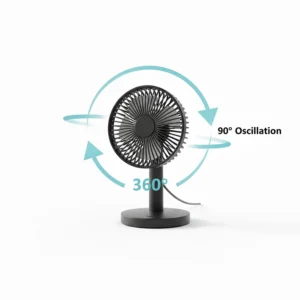
- 360° vertical rotation
- 4.9-foot USB cable
- Ultra-quiet operation (30dB minimum)
What impressed me most was the five-blade design that generates noticeably stronger airflow than competitors. The non-slip rubber base keeps it stable even on high speed, and the 4.9-foot cord gives you plenty of placement flexibility.
Customer feedback highlights its reliability—buyers report using these daily for years without issues. The price point around $12-15 makes it accessible for students and professionals alike.
✅ Pros: Strong airflow, full rotation, quiet operation
❌ Cons: Non-detachable cord, no built-in battery
Best for: Anyone seeking reliable, affordable desk cooling
2. Gaiatop USB Desk Fan – Most Portable Option
If you’re constantly moving between workspace, bedroom, and travel, the Gaiatop USB Desk Fan is your perfect companion. Weighing just 6.5 ounces, this little champion delivers surprising performance despite its compact 5.5-inch size.
Key Specifications:
- 3 adjustable speeds (1500-2500 RPM)
- 90° vertical tilt adjustment
- Compatible with laptops, power banks, car chargers
- 4.9-foot long cable
The 90-degree tilt range lets you direct airflow precisely where you need it. I particularly appreciate how quiet it runs—customers consistently mention being able to use it during video calls without background noise concerns.
At around $10-13, it’s priced competitively while offering excellent build quality. The classic design in multiple colors (blue, pink, black) adds a nice aesthetic touch to any desk setup.
✅ Pros: Lightweight, multiple colors, whisper-quiet
❌ Cons: Limited rotation range compared to competitors
Best for: Travelers and multi-room users
3. BESKAR USB Small Desk Fan – Best for Silent Operation
The BESKAR USB Small Desk Fan takes quiet operation seriously. With its upgraded brushless motor and turbine blade design, it operates at an impressive 20dB minimum—quieter than rustling leaves.
Key Specifications:
- Professional brushless motor
- 3-speed settings with 360° rotation
- 3.9-foot USB cord
- Easy-clean removable front cover
What sets BESKAR apart is the attention to detail: rubber pads underneath prevent desk scratches and vibration noise, while the removable cover makes cleaning accumulated dust a breeze. The company’s focus on quality shows in the 18-month warranty they back every unit with.
Priced between $10-12, it offers premium features at a budget-friendly cost. Users consistently praise its durability and the powerful airflow that reaches 10 feet away even on medium settings.
✅ Pros: Ultra-quiet, 360° rotation, easy maintenance
❌ Cons: Cord-only power (no battery option)
Best for: Quiet environments like libraries and shared offices
4. JZCreater USB Desk Fan – Ultra-Budget Champion
Don’t let the $8-10 price tag fool you—the JZCreater USB Desk Fan delivers impressive performance for the money. This no-frills option focuses on doing one thing well: keeping you cool without breaking the bank.
Key Specifications:
- 3-speed adjustment
- Compact 4.5-inch fan head
- 3.7-foot USB cable
- Self-checking function for power flow protection
The minimalist design makes it perfect for cramped desks or as a bedside companion. While it lacks the rotation range of pricier models, the adjustable tilt head still provides decent directional control.
Customer reviews highlight its reliability despite the low price. Many buyers purchase multiple units—one for home, one for the office—because they’re so affordable.
✅ Pros: Incredibly affordable, compact size, durable
❌ Cons: Basic features, shorter cable length
Best for: Budget-conscious shoppers and multi-unit purchases
5. ARCTIC Breeze – Premium Gooseneck Design
The ARCTIC Breeze represents the premium end of USB cooling solutions. This isn’t just a fan—it’s a thoughtfully engineered cooling accessory with a flexible gooseneck design that offers positioning possibilities other fans can’t match.
Key Specifications:
- Variable speed control (800-1800 RPM)
- Flexible gooseneck neck for infinite positioning
- Steel base with anti-slip rubber pads
- 1.8-meter (5.9 feet) cable length
Drawing from ARCTIC’s expertise in PC cooling fans, the motor operates virtually silent while delivering consistent airflow. The adjustable speed dial on the base lets you fine-tune the breeze intensity to your exact preference.
What justifies the $12-18 price point is the build quality—the steel base feels substantial, and the gooseneck holds position without drooping over time. It’s available in multiple colors including black, white, blue, and even USA patriotic designs.
✅ Pros: Infinite positioning, premium build, adjustable speed dial
❌ Cons: Higher price point, exposed blades
Best for: Users wanting premium quality and maximum flexibility

6. Koonie USB Desk Fan – Best USB-C Option
Welcome to 2026, where USB-C isn’t just for phone charging anymore. The Koonie USB Desk Fan embraces modern connectivity while delivering robust cooling performance with its 7-blade design.
Key Specifications:
- USB-C corded power
- 180° tilt folding mechanism
- 3 adjustable speeds
- Maximum airflow: 15.4 ft/s
The triangular base structure provides excellent stability while the 180° adjustment range offers practical positioning options. At 35dB maximum noise level, it maintains conversation-friendly operation even on high speed.
Priced around $13-16, it bridges the gap between budget and premium categories. The USB-C connection means you can power it from your laptop’s Thunderbolt ports, modern power banks, or USB-C wall adapters—offering unprecedented compatibility with current devices.
✅ Pros: USB-C connectivity, stable base, modern design
❌ Cons: Limited to USB-C ports only
Best for: MacBook users and modern device owners
7. LEMOISTAR USB Desk Fan – Maximum Adjustability
The LEMOISTAR USB Desk Fan takes adjustability to the next level with its remarkable 310-degree tilt range. If you need precise airflow direction, this is your fan.
Key Specifications:
- 4-speed settings
- 310° vertical adjustment range
- Pure copper brushless motor
- Ultra-quiet operation (minimum 10dB)
The four-speed option gives you finer control than typical three-speed models, while the copper motor ensures longevity and efficiency. At just 4.3 inches, it’s remarkably compact yet manages to move substantial air volume.
The 3.9-foot USB cable works with any standard USB port, and the fan is compatible with power banks, laptops, car chargers, and wall adapters. Customers rave about the near-silent operation on low settings—some say they can’t even hear it running.
Priced between $15-20, it’s the priciest on our list but justifies the cost with superior adjustability and build quality.
✅ Pros: Four speeds, 310° adjustment, nearly silent
❌ Cons: Higher price, compact size may limit airflow for larger spaces
Best for: Users needing precise airflow control and quiet operation
Understanding USB Fan Power Consumption
One question I constantly hear is: “Will running a USB desk fan significantly increase my power bill?” The short answer is no, and here’s why.
How Much Power Do USB Fans Actually Use?
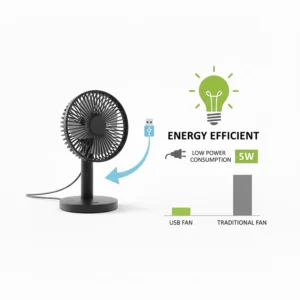
According to USB power delivery standards, USB 2.0 ports provide up to 2.5W (5V at 500mA), while USB 3.0 ports can deliver up to 4.5W (5V at 900mA). Most desk fans operate well within these limits, consuming between 2-4 watts of power.
To put this in perspective: running a USB fan continuously for 8 hours per day costs approximately $0.50-$1.00 per year based on average U.S. electricity rates. That’s less than a single coffee. Your laptop or computer consumes 30-100 watts by comparison—the fan is barely a rounding error in your overall energy usage.
Laptop Compatible Cooling Solutions
Modern laptops play nicely with USB desk fans. The power draw is minimal enough that you won’t notice battery drain even on portable power sources. In fact, positioning a USB fan for laptop cooling can actually improve your device’s performance by preventing thermal throttling during intensive tasks.
For maximum laptop compatibility, look for fans with longer cables (4+ feet) so you have placement flexibility without needing a USB hub positioned right at your workspace.
Choosing the Right USB Powered Desk Fan for Your Needs
Not all USB desk fans are created equal, and your perfect match depends on your specific situation. Let me walk you through the key considerations.
Size and Airflow Considerations
Smaller fans (4-5 inches) excel at personal cooling and tight spaces but won’t cool an entire room. If you just need a breeze on your face during video calls, compact models work perfectly. For shared workspaces or larger desk areas, opt for 5-6 inch models with stronger motors.
The blade count matters too—fans with 5-7 blades typically move more air at lower speeds, creating better airflow without excessive noise.
Noise Levels Matter
If you’re frequently on calls or need concentration, prioritize fans with brushless motors and noise ratings below 30dB. The BESKAR and LEMOISTAR models excel here, operating quietly enough for professional video meetings.
For casual use in noisier environments like workshops or kitchens, noise level becomes less critical.
Rotation and Adjustability Features
Full 360-degree rotation (like the TriPole and BESKAR models) offers maximum flexibility for directing airflow as you move throughout your workspace. Limited rotation (90-180 degrees) works fine if the fan stays stationary.
Gooseneck designs like the ARCTIC Breeze provide unique positioning advantages—you can angle airflow upward to cool your face or downward to cool your hands on the keyboard.
Power Source Compatibility
Most USB fans work with any USB port, but it’s worth verifying compatibility with your devices:
- USB-A: Universal compatibility with computers, laptops, power banks, car chargers
- USB-C: Modern connectivity but requires USB-C ports or adapters
- Cable length: Longer cables (4-5 feet) provide more placement options
Pro tip: if you work from a laptop and want mobility, choose a fan that draws low enough power to run from battery-operated USB power banks. Most models in our guide work great with standard 10,000mAh power banks.
Maintenance Tips for Long-Lasting Performance
Your USB desk fan investment deserves proper care. Here’s how to keep it running smoothly for years.
Regular Cleaning Schedule
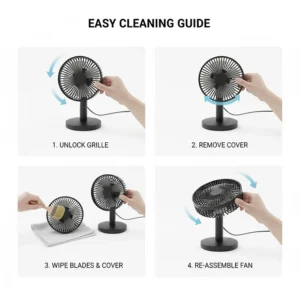
Dust accumulation is the number one performance killer for desk fans. Every 2-3 weeks, wipe down the blades with a microfiber cloth. For fans with removable grills (like BESKAR models), pop off the cover monthly for thorough cleaning.
Never spray cleaning solution directly onto the fan—moisture and electronics don’t mix. Instead, lightly dampen your cloth with water or electronics-safe cleaner.
Optimal Placement Strategies
Position your fan where it won’t constantly suck in debris. Avoid placing it directly next to open windows, near pet areas, or in dusty corners. The cleaner the input air, the less frequently you’ll need to clean the fan itself.
Keep the USB connection secure but not strained. Excessive cable tension can damage the port over time.
When to Replace vs. Repair
USB fans are relatively inexpensive, so if your fan develops motor noise, weakened airflow despite cleaning, or electrical issues, replacement usually makes more sense than repair. Most quality units should last 2-4 years with regular use before showing signs of wear.
USB Desk Fan vs. Traditional Cooling: What’s Better?
Let’s address the elephant in the room: how do USB desk fans compare to traditional cooling methods?
Energy Efficiency Comparison
| Cooling Method | Power Draw | Coverage Area | Portability | Annual Cost |
|---|---|---|---|---|
| USB desk fan | 2-4W | Personal (1-3 ft) | Excellent | <$1 |
| Traditional desk fan | 20-75W | Small room | Limited | $8-30 |
| Tower fan | 40-100W | Medium room | Poor | $15-40 |
| Air conditioning | 1000-4000W | Whole home | None | $200-800 |
The numbers speak for themselves. For personal cooling at a desk, nothing beats the efficiency of a computer USB fan. You’re using a fraction of the energy while getting targeted cooling exactly where you need it.
Space and Convenience Factors
USB fans shine in cramped quarters. Dorm rooms, cubicles, small apartments—anywhere space is premium, a 5-inch USB fan delivers cooling without eating up valuable real estate.
The plug-and-play nature means no installation, no mounting brackets, and no dedicated power outlets needed. Grab your fan, plug it into any USB port, and you’re cooling in seconds.
Cost-Effectiveness Analysis
Even the premium ARCTIC Breeze at $18 costs less than a single restaurant meal. Budget options like the JZCreater ring in under $10. Compare this to traditional fans ($30-60) or portable AC units ($200+), and the value proposition becomes crystal clear.
For occasional cooling needs or supplemental airflow, USB fans deliver unbeatable return on investment.
Special Use Cases and Applications
USB desk fans have found creative applications beyond basic desk cooling. Here are some innovative ways people use these versatile devices.
Gaming Setup Cooling
Gamers face unique cooling challenges—high-performance equipment generates serious heat, and marathon sessions need sustained airflow. Position a USB fan for laptop cooling near your gaming rig’s intake vents to improve overall system cooling.
Some gamers run dual USB fans—one for personal cooling and one directed at their equipment. With the low power consumption, running multiple fans simultaneously barely impacts your system.
Remote Work Optimization
The work-from-home revolution made USB desk fans more relevant than ever. During video calls, a quiet fan like the BESKAR or LEMOISTAR keeps you cool without creating background noise that disrupts your audio.
For those hot afternoon hours when your home office feels like a sauna, a USB powered desk fan provides relief without the expense of running whole-home AC just for one room.
Travel and Mobile Applications
Frequent travelers appreciate laptop compatible fans that pack easily and run from power banks. Some creative uses I’ve seen include:
- Hotel room supplemental cooling
- Car camping comfort (powered by car USB ports)
- Outdoor events with portable batteries
- Pet cooling during travel
The compact size and low power requirements make USB fans incredibly versatile for mobile lifestyles.
❓ Frequently Asked Questions
❓ Can a USB desk fan cool an entire room?
❓ Are USB desk fans safe to leave running overnight?
❓ Will a USB desk fan drain my laptop battery quickly?
❓ Can I use a USB desk fan with a power bank?
❓ How do I clean my USB desk fan without damaging it?
Conclusion: Finding Your Perfect USB Desk Fan Match
After reviewing dozens of models and analyzing hundreds of customer experiences, the verdict is clear: USB desk fans deliver exceptional value for personal cooling needs. Whether you’re investing $8 in the budget-friendly JZCreater or splurging $18 on the premium ARCTIC Breeze, you’re getting efficient, portable cooling that works.
For most users, I recommend the TriPole Small Desk Fan as the best overall choice—it balances price, performance, and features beautifully. If quiet operation tops your priority list, the BESKAR USB Small Desk Fan won’t disappoint. And for those embracing modern USB-C connectivity, the Koonie USB-C Fan represents the future of desk cooling.
Remember, the best USB desk fan is the one that fits your specific needs. Consider your workspace size, noise tolerance, portability requirements, and budget when making your decision. Any of the seven fans in this guide will serve you well, transforming your uncomfortable hot spot into a pleasant, productive environment.
Don’t let another sweaty work session derail your productivity. Invest in a quality USB fan for laptop or desktop use today, and discover how such a small device can make such a big difference in your daily comfort.
✨ Don’t Miss These Exclusive Deals!
🔍 Take your workspace comfort to the next level with these carefully selected USB desk fans. Click on any highlighted product above to check current pricing and availability. These cooling solutions will help you maintain focus and productivity even during the hottest days!
Recommended for You
- 7 Best Quiet Desk Fans for Office: Silent Cooling 2026
- 7 Best Desk Fans 2026: Top Rated Reviews & Quiet Cooling Guide
- 7 Best Cheap Bladeless Fans Under $100 (2026 Guide)
Disclaimer: This article contains affiliate links. If you purchase products through these links, we may earn a small commission at no additional cost to you.
✨ Found this helpful? Share it with your friends! 💬🤗
